Cybergy Presentation Template: Design for Any Audience
Creating a compelling visual narrative often requires more than just good data; it demands a cohesive aesthetic that guides the viewer through complex information without friction. The Presentation Template - Cybergy serves as a comprehensive design framework built specifically to bridge the gap between raw content and polished delivery. Rather than forcing users to build layouts from scratch, this template provides a structured environment where creativity meets functionality. It is designed to be versatile enough for a creative agency portfolio yet structured enough for a corporate pitch deck, making it a practical tool for a wide spectrum of users ranging from students to established business owners.
Defining the Cybergy Framework
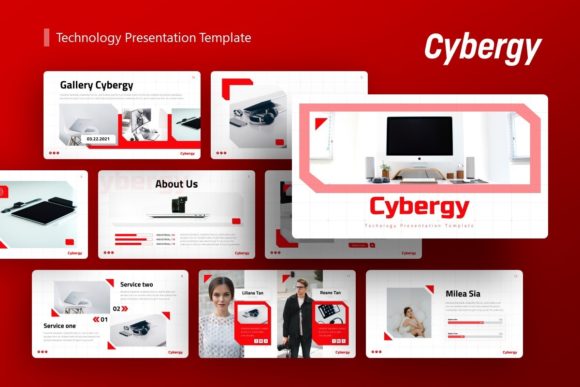
At its core, the Presentation Template - Cybergy is a collection of 36 distinct slides engineered for PowerPoint (.PPTX). However, viewing it merely as a set of pre-made backgrounds misses its primary utility. The system relies on Master Slides, which act as the foundational DNA of the presentation. This architecture allows global changes—such as updating a logo, changing a color palette, or adjusting font hierarchy—to propagate instantly across multiple slides. For users who value efficiency, this reduces hours of formatting work into minutes of strategic adjustment.
The template includes handcrafted infographics and pixel-perfect illustrations that are fully vector-based. This distinction matters significantly when scaling visuals for different display environments, from laptop screens to large conference projectors. Because these elements are editable vectors rather than static images, they maintain crispness at any size and can be recolored to match specific brand guidelines. The inclusion of drag-and-drop picture placeholders further streamlines the workflow, allowing users to focus on messaging rather than alignment tools.
Perspectives Across Different User Groups
While the technical specifications remain constant, the value proposition of the Cybergy template shifts depending on who is using it and what they aim to achieve. A freelancer evaluating this asset prioritizes different features than a university educator or a startup founder.
For Entrepreneurs and Startup Founders
In the high-stakes environment of fundraising and pitching, speed and credibility are paramount. Founders often lack the budget for bespoke design agencies but cannot afford amateurish visuals. For this group, the Pitch Deck capabilities within the Presentation Template - Cybergy offer immediate commercial value. The pre-structured slides for team introductions, market analysis, and financial projections provide a logical flow that investors expect. The priority here is reliability and professional presentation; the template acts as a silent partner that establishes trust before the speaker even begins their talk.
Creative Agencies and Freelancers
Creatives face a unique paradox: they must showcase their own design skills while presenting client work. For photographers, designers, and agencies, the Portfolio and Creative Agency aspects of this template are most relevant. These users evaluate the asset based on flexibility and aesthetic neutrality. They need a canvas that enhances their work without overpowering it. The resizable graphics and clean typography allow creatives to inject their unique style while maintaining a consistent layout structure. Here, the learning value comes from reverse-engineering the master slides to understand advanced PowerPoint techniques that can be applied to future custom projects.
Educators and Corporate Trainers
For those in education or internal corporate training, clarity trumps trendiness. Educators utilizing the Presentation Template - Cybergy are likely focused on the infographic and data visualization components. Complex concepts require visual scaffolding to aid retention. The handcrafted infographics serve as cognitive aids, breaking down dense information into digestible chunks. Unlike entrepreneurs who may use a deck once, educators often reuse and update materials semester after semester. Therefore, ease of editing and long-term usefulness become the deciding factors. The ability to quickly swap out content while retaining the visual logic saves significant preparation time over an academic year.
Evaluating Priorities: What Matters Most?
Selecting the right digital asset involves weighing competing priorities. Understanding how the Presentation Template - Cybergy aligns with your specific constraints can prevent buyer’s remorse and ensure the tool actually solves your problem.
- Ease of Use vs. Customization Depth: Beginners will appreciate the drag-and-drop image placeholders and documentation file, which lower the barrier to entry. Experienced users, conversely, will value the Master Slide architecture that permits deep customization without breaking the layout. If you have never used PowerPoint beyond basic text entry, the included documentation is essential for unlocking the template's full potential.
- Cost Efficiency vs. Bespoke Quality: Hiring a designer for a 36-slide custom deck can cost hundreds or thousands of dollars. This template offers a middle ground: professional quality at a fraction of bespoke pricing. For small business owners operating on thin margins, this cost-to-quality ratio is often the primary decision driver.
- Speed vs. Originality: If you have a deadline in 48 hours, the pre-built layouts are indispensable. However, if originality is your main KPI, you must invest time in modifying the colors, fonts, and imagery. The template provides the skeleton, but the user must provide the unique voice to avoid looking generic.
Practical Application Scenarios
To better visualize how this template integrates into real workflows, consider these practical applications across different domains.
The Company Profile Update: A mid-sized logistics firm needs to update its annual company profile. Instead of starting from zero, the marketing manager uses the Corporate and Business slides. They utilize the vector icons to represent service areas and the infographic slides to visualize year-over-year growth. The result is a cohesive document that looks professionally designed despite being created in-house.
The Personal Portfolio: A recent graphic design graduate needs to present their capstone project during interviews. They use the Photography and Portfolio layouts to create a visual resume. By utilizing the master slides, they ensure every page has consistent margins and typography, demonstrating attention to detail—a critical soft skill for designers.
The Educational Workshop: A cybersecurity consultant is hosting a workshop for non-technical staff. They leverage the "Cybergy" aesthetic to reinforce the topic matter visually. Using the editable illustrations, they customize diagrams to reflect the client’s specific network architecture, making abstract security concepts tangible and relevant.
Determining Fit for Your Project
Before adopting the Presentation Template - Cybergy, assess your current needs against the tool’s capabilities. It is an excellent fit if you require a scalable, multi-purpose foundation and are comfortable working within PowerPoint’s ecosystem. It is particularly strong for users who need to produce varied content types—from pitch decks to portfolios—without purchasing multiple single-use templates.
However, it may not be the right choice if you require proprietary software features outside of PowerPoint, or if you are looking for a fully automated AI-generation tool. This template is a design accelerator, not a content generator. It requires user input, strategic thinking, and content creation. The note regarding preview images is also crucial for expectation management; the visual quality depends heavily on the assets you insert. Users should be prepared to source high-quality photography and write compelling copy to match the standard set by the template’s design.
Ultimately, the Presentation Template - Cybergy functions best as a collaborative design partner. Whether you are a hobbyist organizing personal photos, a marketer launching a product, or an executive reporting to stakeholders, the template offers a structured path to visual clarity. By leveraging the 36 slides, vector assets, and master slide technology, users can transform disparate ideas into a unified, professional narrative that resonates with their specific audience.