GoGrowth Presentation Template: Design & Finance Decks
Creating a compelling narrative for investors, clients, or stakeholders often feels like a balancing act between aesthetic appeal and data density. This is where the Presentation Template - GoGrowth distinguishes itself in a crowded marketplace of slide decks. Rather than forcing you to choose between a creative portfolio style and a rigid corporate finance layout, this template bridges the gap. It serves as a comprehensive visual toolkit designed specifically for professionals who need to communicate complex growth strategies without sacrificing design integrity.
For entrepreneurs, marketers, and agency owners, the friction of building a deck from scratch is a significant productivity drain. GoGrowth addresses this by providing a structured yet flexible foundation. Whether you are introducing a new financial product, pitching a startup valuation, or showcasing a creative agency’s quarterly performance, the underlying architecture supports your content rather than competing with it. The true value lies in its dual nature; it functions equally well for high-stakes financial reporting and vibrant creative showcases, making it a versatile asset for diverse professional portfolios.
Core Features That Drive Efficiency
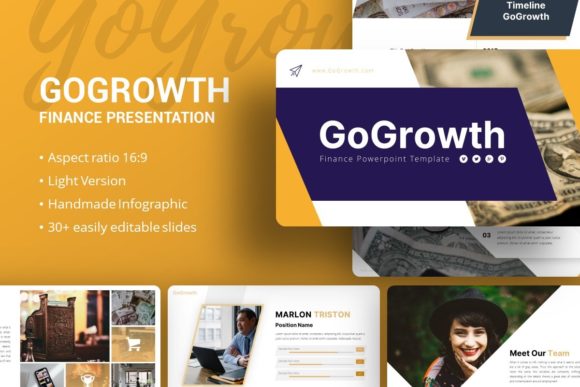
When evaluating presentation assets, technical specifications matter just as much as visual style. The GoGrowth template includes 35 unique slides per variation, offering enough variety to construct a full-length keynote or a concise ten-minute pitch without repetitive layouts. Crucially, these are not static images flattened into backgrounds. Every element is built on Master Slides within PowerPoint (.PPTX), ensuring that global changes to fonts, colors, or logos propagate instantly across the entire deck. This master-slide architecture is essential for maintaining brand consistency, especially when multiple team members collaborate on a single file.
Data visualization is often the weakest link in business presentations. GoGrowth mitigates this with handcrafted infographics that are fully editable within PowerPoint. You do not need external vector software like Illustrator to adjust charts or graphs. All graphics are resizable and editable, meaning you can tailor data representations to your specific metrics without losing resolution or clarity. The inclusion of pixel-perfect illustrations and vector icons further reduces the need to source third-party assets, keeping your workflow contained within a single environment.
- Master Slide Integration: Ensures global, consistent edits across all 35 slides.
- Native Editability: Infographics and charts modify directly in PowerPoint.
- Drag-and-Drop Placeholders: Streamlines image replacement without breaking layout alignment.
- Vector Assets Included: Scalable icons and illustrations maintain quality at any size.
- Comprehensive Documentation: Guides users through customization and setup processes.
Versatile Applications Across Industries
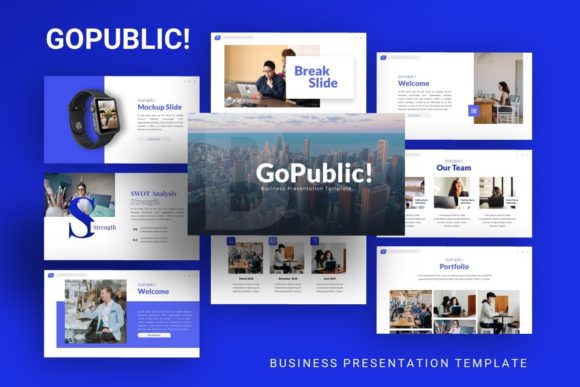
The adaptability of the Presentation Template - GoGrowth makes it relevant for a wide spectrum of users beyond just financial analysts. For Creative Agencies and Portfolios, the template offers clean grids and typography-focused layouts that let visual work breathe. Photographers and designers can utilize the picture placeholders to create immersive case studies that still retain a professional, commercial edge. Unlike standard portfolio templates that lack structure for text-heavy explanations, GoGrowth provides balanced compositions suitable for detailing project scopes, timelines, and ROI alongside imagery.
In the Startup and Pitch Deck arena, clarity is currency. Investors review hundreds of decks annually, and fatigue sets in quickly. This template provides the familiar structural cues that investors expect—problem/solution slides, market sizing, and traction metrics—but presents them with modern polish. The "Introducing GoGrowth Finance" aspect specifically caters to fintech startups or companies raising capital, offering specialized slides for financial projections and unit economics that generic templates often lack. This specificity helps founders communicate fiscal responsibility and strategic foresight more effectively.
Corporate teams and educators also find significant utility here. For internal business reviews, the ability to swap out placeholder data with actual quarterly results using native PowerPoint tools saves hours of formatting time. Educators and trainers can repurpose the infographic slides to explain complex concepts visually, transforming dry lectures into engaging visual narratives. Even freelancers and personal brands can leverage the personal portfolio variations to present their services and rates in a format that looks significantly more premium than a standard PDF resume.
Strategic Benefits for Professional Communication
Adopting a premium template like GoGrowth is ultimately an investment in communication efficacy. The primary benefit is speed to deployment. By eliminating the blank canvas paralysis, professionals can focus entirely on refining their message and rehearsing their delivery. In fast-paced environments where turnaround times are tight, having a pre-validated design system allows for rapid iteration based on stakeholder feedback without worrying about breaking the visual hierarchy.
Furthermore, the template enhances brand perception. High-quality design signals competence and attention to detail. When presenting financial data or creative concepts, a polished aesthetic builds subconscious trust with the audience. The pixel-perfect nature of the included assets ensures that your presentation looks professional on everything from laptop screens to large conference room projectors. This consistency reinforces brand identity and helps distinguish your proposal from competitors using default or outdated slide masters.
User experience during the editing process is another critical advantage. The drag-and-drop picture placeholders and intuitive layer naming conventions reduce the learning curve. Users do not need advanced graphic design skills to achieve a professional result. This democratization of design allows subject matter experts—whether they are accountants, developers, or photographers—to produce agency-quality decks independently, reducing bottlenecks and reliance on overburdened design departments.
Practical Considerations for Implementation
Before integrating the Presentation Template - GoGrowth into your workflow, there are practical factors to consider to maximize its effectiveness. First, understand the licensing and asset inclusion. As noted in the product details, demo images are for preview purposes only and are not included in the download. You must have your own high-quality photography or licensed stock assets ready to populate the placeholders. Using low-resolution or watermarked images will undermine the premium feel of the template.
Secondly, assess your software compatibility. While the .PPTX format is industry-standard, certain advanced animations or font renderings may vary between PowerPoint versions or when opening files in Keynote or Google Slides. For best results, stick to Microsoft PowerPoint. Review the included documentation file immediately upon purchase; it typically contains vital information about font installation, color palette customization, and troubleshooting common editing issues. Skipping this step is the most common reason users struggle with template adoption.
Finally, resist the urge to use every single slide. With 35 options available, it can be tempting to include excessive content. Effective presentation design is about curation. Select only the slides that directly support your narrative arc. Customize the color scheme to match your specific brand guidelines rather than relying on the default palette. Remember that the template is a vessel for your unique story; the goal is to make the design invisible so that your message takes center stage. By treating GoGrowth as a strategic framework rather than just a collection of pretty slides, you transform it into a powerful engine for professional growth and communication.