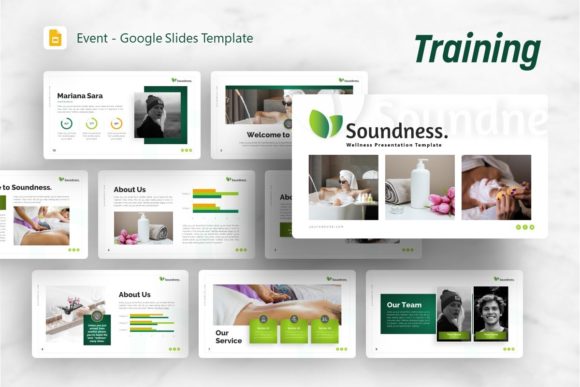
Google Slides Template Soundness: A Practical Design Guide
Creating a compelling presentation often requires balancing aesthetic appeal with structural integrity. For professionals and creators seeking a versatile foundation, the Google Slides Template - Soundness offers a robust framework designed to bridge the gap between wellness-focused narratives and corporate professionalism. While originally conceptualized around themes of soundness and wellness, this template’s architecture supports a much broader spectrum of applications. Understanding how to leverage its specific features can transform a standard slide deck into a strategic communication tool that saves time while maintaining high design standards.
Versatility Across Professional and Creative Domains
The primary value of the Google Slides Template - Soundness lies in its adaptability. Although the naming convention suggests a niche focus on health or wellness, the underlying design system is neutral enough to serve diverse industries without requiring extensive rebranding. This flexibility is crucial for users who manage multiple projects or clients with varying visual identities.
For creative agencies and freelancers, the template functions as a dynamic portfolio structure. The layout accommodates high-resolution photography and minimalist typography, allowing visual work to take precedence over decorative elements. When used for a company profile or corporate business update, the same slides transition seamlessly into data-driven formats. Startups preparing a pitch deck will find the narrative flow particularly useful; the sequence of slides guides the audience through problem identification, solution proposal, and market validation without feeling disjointed. Even educators and personal brands can utilize the clean aesthetics to present information clearly, reducing cognitive load for their audience.
Streamlining Workflow with Master Slide Architecture
Efficiency in presentation design is rarely about working faster; it is about working smarter. The Google Slides Template - Soundness is built upon a comprehensive Master Slide system. This technical foundation is significant because it allows for global, consistent changes across the entire deck. Rather than formatting thirty-six individual slides manually, a user can adjust fonts, color palettes, or logo placement in the master view, and those changes propagate instantly throughout the presentation.
This feature directly addresses a common pain point in collaborative environments. When multiple team members contribute to a single deck, formatting inconsistencies inevitably arise. By relying on the master slide infrastructure included in this template, teams maintain visual coherence regardless of who edits the file. Furthermore, the inclusion of resizable and editable graphics ensures that layouts do not break when content volume changes. If a bullet list expands from three points to five, the container adjusts proportionally, preserving the pixel-perfect alignment that gives professional presentations their polished look.
Enhancing Data Communication Through Handcrafted Infographics
Data visualization is often where presentations fail. Generic chart tools can produce sterile graphics that disengage audiences. The Google Slides Template - Soundness includes handcrafted infographics specifically designed within PowerPoint and compatible with Google Slides. These are not merely static images but fully editable vector-based elements.
Consider a wellness startup presenting user growth metrics or a corporate team explaining quarterly KPIs. Instead of inserting a default bar chart, users can utilize the custom infographic slides to create a visual metaphor that aligns with their brand story. Because these graphics are vector-based, they remain crisp at any zoom level or projection size. More importantly, being fully editable means the data representation can be tailored to the specific narrative. A user can change colors to match brand guidelines, adjust shapes to emphasize specific data points, or simplify complex diagrams to focus on key takeaways. This capability transforms raw data into a persuasive visual argument rather than a simple display of numbers.
Practical Asset Management and File Considerations
When adopting any digital asset, understanding exactly what is included prevents workflow disruptions. The Google Slides Template - Soundness package is comprehensive, yet users must be aware of specific licensing and usage notes. The download typically includes the .PPTX file, which ensures compatibility across Microsoft PowerPoint and Google Slides platforms. Additionally, a documentation file is provided to guide users through customization processes, and a set of vector icons is included to support content creation without requiring external subscriptions.
A critical distinction for new users involves imagery. All photographs seen in the preview demo are for demonstration purposes only and are not included in the downloadable files. This is standard practice in template distribution due to licensing restrictions, but it requires users to have their own image assets ready. Fortunately, the template includes dedicated picture placeholders with drag-and-drop functionality. This feature simplifies the replacement process significantly; users simply drag their own licensed or original photos into the designated frames, and the image automatically crops and masks to fit the layout. This eliminates the need for manual resizing or external photo editing software, streamlining the path from blank template to finished presentation.
Strategic Content Structuring with 36 Unique Slides
Volume matters when selecting a template, but variety matters more. Having access to 36 distinct slide layouts provides a substantial toolkit for storytelling. The Google Slides Template - Soundness avoids redundancy by offering specialized layouts for different content types. This breadth supports complex narratives that require shifting between text-heavy analysis, visual showcases, team introductions, and comparative data.
For a personal portfolio, this variety allows a creator to showcase case studies using timeline slides, display testimonials with quote layouts, and present skills via icon grids. In a business context, the same diversity enables a seamless transition from executive summaries to detailed financial projections. The risk with smaller templates is forcing content into ill-fitting layouts, which compromises readability. With 36 options, users are more likely to find a native layout that matches their content structure, reducing the temptation to overcrowd slides or use inconsistent formatting hacks.
Evaluating Fit and Potential Limitations
While the Google Slides Template - Soundness offers significant advantages, it is important to assess whether it aligns with specific project needs. The design language leans toward clean, modern minimalism. Organizations requiring highly ornate, traditional, or grunge-style aesthetics may find the base template requires more modification than anticipated. Similarly, while the wellness origin provides a calming and organized feel, heavily industrial or technical sectors might need to introduce more aggressive visual elements to match their industry tone.
Additionally, users should consider their proficiency with master slides. While the template makes editing easier, maximizing its potential requires a basic understanding of slide masters and layout editing. Users completely new to presentation software may need to consult the included documentation thoroughly before beginning. However, for those willing to engage with the tool’s structure, the learning curve pays dividends in long-term efficiency. The template is best suited for users who view presentations as evolving documents rather than one-off creations. Its true value emerges when it becomes a reusable asset in a broader content strategy, enabling rapid deployment of high-quality decks for recurring meetings, client pitches, or portfolio updates.
Optimizing Visual Consistency for Brand Authority
Consistency builds trust. Whether presenting to investors, clients, or students, a cohesive visual identity signals professionalism and attention to detail. The Google Slides Template - Soundness facilitates this consistency through its integrated design system. The pixel-perfect illustrations and predefined color schemes serve as guardrails, preventing design drift even when multiple stakeholders are involved.
For small business owners and entrepreneurs, this level of polish is often difficult to achieve without hiring a dedicated designer. By utilizing a professionally crafted template, they gain access to design expertise embedded in the file structure. The result is a presentation that looks bespoke rather than generic. When combined with the editable vector icons and resizable graphics, the template allows for customization that feels intentional. Users can adapt the wellness-inspired serenity to convey stability in finance, clarity in education, or balance in lifestyle branding. Ultimately, the template serves as a silent partner in communication, handling the heavy lifting of visual design so the presenter can focus entirely on delivering their message with confidence and clarity.