Paintism: A Creative Presentation Template Guide
When you are preparing a pitch deck or a company profile, the visual atmosphere often speaks before you utter a single word. The Presentation Template - Paintism offers a distinct departure from sterile corporate minimalism, embracing an aesthetic that feels handcrafted and intentional. This template is designed for professionals who need to communicate creativity without sacrificing structural clarity. It bridges the gap between artistic expression and business functionality, making it a versatile asset for creative agencies, startups, photographers, and personal portfolios. Rather than forcing your content into a rigid grid, Paintism provides a canvas that suggests innovation and bespoke service.
Defining the Visual Personality and Style
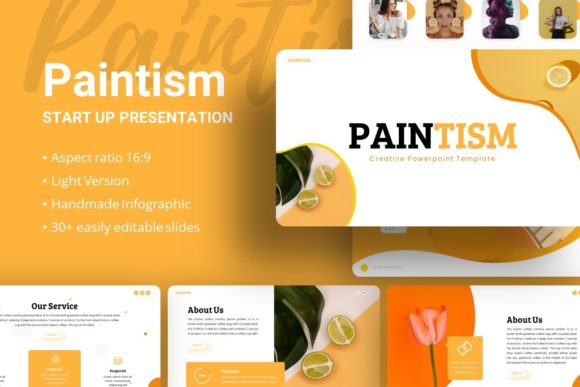
The core appeal of the Presentation Template - Paintism lies in its ability to soften the edges of standard business communication. While many templates rely heavily on stark sans serif fonts and flat colors, this design introduces elements reminiscent of brushwork and organic textures. This does not mean the layout is messy; rather, it utilizes modern typography and pixel-perfect illustrations to create a sense of warmth and approachability. For a brand strategist or marketer, this visual language signals that your organization values human connection and detail.
This template works exceptionally well when your narrative requires a touch of artistry. If you are presenting a portfolio for photography or an editorial design concept, the background elements and slide transitions support the imagery rather than competing with it. The style balances display font headers for impact with clean body text for readability. This duality is crucial. You want the audience to admire the design, but they must also be able to read your financial projections or case studies without strain. Paintism achieves this by anchoring its artistic flair within a master slide system that maintains consistency across all 35 slides.
Strategic Applications Across Industries
Versatility is a key requirement for any premium design asset. The Presentation Template - Paintism is engineered to adapt to various professional contexts while retaining its unique character. Understanding where and how to deploy this template can significantly enhance your project's reception.
- Creative Agencies and Portfolios: This is the template’s natural habitat. The handcrafted infographic styles allow you to showcase processes and workflows as visual stories. When pitching branding or packaging design services, the template itself serves as proof of your aesthetic sensibilities.
- Startups and Pitch Decks: Investors see hundreds of identical decks. Using Paintism helps differentiate your startup by suggesting a strong brand identity from day one. The creative font choices and unique layouts make market analysis and problem-solution slides feel fresh and engaging.
- Corporate and Business Profiles: Even traditional companies benefit from this aesthetic when discussing innovation, CSR initiatives, or internal culture. It softens the corporate tone, making annual reports or team introductions feel more personal and less bureaucratic.
- Content Creators and Educators: For webinars, workshops, or digital courses, the visual variety keeps viewers engaged. The picture placeholders are optimized for drag-and-drop functionality, allowing creators to update visuals quickly without breaking the layout.
Enhancing Readability and Brand Perception
A common misconception about artistic presentation templates is that they sacrifice legibility for style. However, effective editorial design principles are embedded in the Presentation Template - Paintism. The hierarchy is established through size, weight, and whitespace rather than just color. This ensures that even with decorative elements, the primary message remains the focal point. When evaluating this template for your needs, pay attention to how the text blocks interact with the graphics. The designers have accounted for contrast ratios and safe zones, which is essential for projecting professionalism.
Your choice of presentation template directly influences brand perception. Consistency builds trust. Because Paintism is based on master slides, you can adjust global colors and fonts instantly. This means your logo design, social media graphics, and slide deck can share a cohesive visual DNA. If your brand uses a specific serif font or a particular color palette, the editable nature of this file allows you to integrate those assets seamlessly. This level of customization transforms a generic template into a proprietary brand tool, reinforcing recognition every time you present.
Practical Guidance for Customization and Licensing
To get the most value out of the Presentation Template - Paintism, you should approach customization strategically. The included documentation file is a critical resource. Before diving into the .PPTX file, review the guide to understand how the master slides are structured. This prevents accidental layout breaks when you start dragging and dropping images. Since all graphics are resizable and editable vectors, you can scale infographics for different screen sizes without losing quality—a vital feature for hybrid presentations that might be viewed on both large conference screens and laptop displays.
Font pairing is another area where users often stumble. While the template comes with recommended typefaces, you may want to swap them to match your existing brand identity. If the template uses a handwritten font for accents, pair it with a highly legible sans serif for body copy. Avoid using two decorative fonts together, as this creates visual noise. Test your pairings at a distance; what looks good on your monitor may be unreadable on a projector. Additionally, always verify commercial licensing for any new fonts you introduce. The template includes vector icons and graphics, but external typefaces may require separate licenses for commercial use.
Evaluating Fit and Technical Considerations
Before committing to the Presentation Template - Paintism, assess whether its personality aligns with your specific content. If you are presenting dense legal data or technical engineering schematics, a more austere template might be appropriate. However, if your goal is to inspire, persuade, or showcase visual work, this template is a strong contender. Remember that the demo images are for preview purposes only. Your final presentation will rely entirely on the quality of your own photography and copy. The template provides the frame, but you must provide the art.
Finally, consider the technical workflow. The 35-slide count is substantial, offering enough variety to cover introduction, methodology, team, financials, and contact sections without repetition. Utilize the handcrafted infographics to break up text-heavy slides. Data visualization is often where creative presentations fail, but Paintism’s vector-based charts allow you to maintain the aesthetic while presenting accurate information. By treating the template as a flexible design system rather than a static set of backgrounds, you ensure that your final output is both visually stunning and functionally robust.