Presentation Template - Skypass: A Practical Design Guide
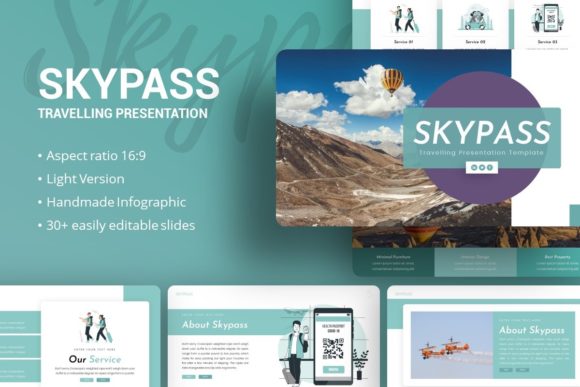
Creating a compelling visual narrative often requires balancing aesthetic appeal with functional clarity. For professionals and creators who need to communicate complex ideas without spending weeks on graphic design, the Presentation Template - Skypass offers a structured foundation. This resource is designed to bridge the gap between raw content and polished delivery, specifically for users operating within PowerPoint environments. Whether you are preparing a startup pitch deck, showcasing a photography portfolio, or outlining a corporate profile, having a pre-designed framework allows you to focus on message refinement rather than pixel alignment. The Introducing Skypass Travelling Presentation variant extends this utility to travel-related narratives, but the core value lies in its adaptability across diverse professional contexts.
Streamlining Visual Communication Through Master Slides
One of the most significant advantages of using a professionally structured template like Skypass is the implementation of Master Slides. In practical terms, this feature ensures global consistency across your entire deck. When you adjust a font style, color palette, or logo placement on a master slide, that change propagates instantly to all associated slides. This is particularly valuable for teams or individuals managing multiple presentations who need to maintain strict brand guidelines. Instead of formatting thirty-five individual slides manually, you can update the entire presentation’s identity in seconds. This efficiency reduces the cognitive load associated with design maintenance, allowing presenters to dedicate more mental energy to storytelling and data accuracy. For corporate and business users, this consistency signals professionalism and attention to detail, which can subtly influence stakeholder confidence during high-stakes meetings.
Adapting the 35-Slide Structure for Diverse Use Cases
The inclusion of 35 unique slides provides a comprehensive toolkit, but the true benefit emerges when users understand how to select and adapt these layouts for specific goals. Not every presentation requires every slide, and knowing which ones to utilize is key to effective communication.
- Creative Agencies and Portfolios: Utilize the image-heavy layouts and gallery grids to showcase work samples. The drag-and-drop picture placeholders make it simple to swap demo images with actual project photography without breaking the layout’s aspect ratio or alignment.
- Startups and Pitch Decks: Leverage the handcrafted infographic slides to visualize market size, growth projections, or user demographics. Investors often scan decks quickly; having pre-designed data visualization structures helps ensure your key metrics are immediately legible and impactful.
- Personal Branding: Use the biography and timeline slides to construct a cohesive personal narrative. These layouts provide a visual rhythm that text-only resumes lack, helping freelancers and consultants stand out in competitive markets.
- Educational and Training Content: The variety of text-and-image combinations supports instructional design principles, allowing educators to break down complex topics into digestible visual chunks without needing advanced design skills.
Enhancing Data Storytelling with Editable Infographics
Data visualization is often where non-designers struggle most. Creating charts and diagrams from scratch in PowerPoint can be tedious and prone to alignment errors. The Presentation Template - Skypass addresses this through handcrafted, fully editable infographics. Unlike static images imported from external software, these graphics are native vector elements within the .PPTX file. This means every segment of a chart, every icon in a process diagram, and every label is resizable and recolorable directly in PowerPoint. For a marketer presenting quarterly results or a researcher sharing findings, this editability is crucial. You can adjust the data representation to match your specific numbers while maintaining the professional polish of the original design. Furthermore, because these are vector-based, they remain crisp and pixel-perfect regardless of screen size or projection resolution, eliminating the blurriness that often plagues resized raster images.
Practical Workflow Benefits and Time Management
Beyond aesthetics, the primary return on investment for any presentation asset is time saved. Building a 35-slide deck from a blank canvas typically requires dozens of hours of design iteration. With Skypass, the structural decisions have already been made. The drag-and-drop functionality for picture placeholders eliminates the need for manual cropping and masking, which are common time sinks in presentation design. Documentation files included with the template further accelerate the learning curve, ensuring users can locate specific assets or understand layer structures without trial and error. For small business owners and freelancers wearing multiple hats, this efficiency translates directly to billable hours saved or faster time-to-market for proposals. The ability to rapidly prototype different visual approaches also encourages experimentation; because changes are low-cost in terms of time, users are more likely to test alternative layouts to see what best supports their narrative.
Understanding File Contents and Usage Considerations
To maximize the utility of the Presentation Template - Skypass, users should have realistic expectations regarding what is included. The package contains the PowerPoint .PPTX file, a documentation guide, and vector icons. It is important to note that all images shown in preview demos are for demonstration purposes only and are not included in the downloadable files. This is standard industry practice, as licensing for stock photography varies by user and region. Practically, this means you must have your own visual assets ready before beginning customization. While the placeholders make insertion easy, the quality of your final presentation will still depend heavily on the resolution and relevance of the images you provide. Additionally, while the template is highly customizable, it works best when users respect the underlying grid system. Drastically altering slide dimensions or removing master slide elements can sometimes disrupt the intended harmony of the design. Users seeking complete freedom to ignore structural conventions might prefer starting from scratch, whereas those who value guided design will find Skypass optimally supportive.
Evaluating Fit for Your Specific Presentation Needs
While versatile, no single template suits every scenario perfectly. The Presentation Template - Skypass excels in modern, clean, and visually driven contexts. It is ideal for creative agencies, tech startups, travel bloggers, and personal portfolios where visual engagement is paramount. However, organizations requiring dense, text-heavy academic formatting or highly specialized technical diagrams may need to supplement this template with additional custom slides. Similarly, users working in legacy versions of PowerPoint should verify compatibility, as some advanced animation or vector features may render differently in older software. Before committing to this template, review your content outline against the available 35 slides. If your narrative requires specialized layouts not present in the set, consider whether you have the design skills to create matching custom slides that integrate seamlessly with the existing master styles. When the fit is right, Skypass serves as a powerful accelerator; when the fit is partial, it can still serve as an excellent starting point for hybrid designs.
Ultimately, the value of the Introducing Skypass Travelling Presentation and the broader Skypass ecosystem lies in its role as a professional enabler. It removes technical barriers to high-quality visual communication, allowing experts in various fields to present their work with the polish typically reserved for dedicated design teams. By leveraging features like master slides, editable vector infographics, and intuitive placeholder systems, users can transform raw information into persuasive visual experiences efficiently. Whether you are pitching investors, documenting a journey, or showcasing creative work, this template provides the structural integrity needed to let your content shine without the distraction of inconsistent or amateurish design.